🧑🎓 This article is for attendees.
Your CEU Events attendee account stores your professional memberships and state license numbers — and uses them to automatically report earned credits where applicable. This article explains why this matters, the difference between memberships and licenses, and how to add or update each.
Why keep your memberships and licenses up to date
Accurate credentials in your account aren't just paperwork — they directly affect how your continuing education credits are recorded:
- Automatic credit reporting. When your memberships and licenses are on file, CEU Events reports earned credits to the applicable organizations automatically.
- Audit-ready records. Your account becomes a single source of truth for your CE history, with credits tied to the right credentials for compliance.
- Bulk certificate export. Once your credentials are on file, you can filter and export your certificates by date range — either as individual files or one combined file. Useful when submitting for membership or license renewal.
- Streamlined reporting across over 100 organizations. CEU Events recognizes credits from a wide network of associations and state licensing boards. The more credentials you add, the more thoroughly your activity is reported.
- No re-entry every event. Once added, your credentials are applied to every event you attend — no need to re-enter them at each registration.
Memberships vs. Licenses
Two different types of credentials, two different workflows:
- Memberships are your affiliations with professional associations — like AIA, IDCEC, ASID, and others. Some associations require a membership number to report your credits; others don't. You'll be prompted to enter the number wherever needed.
- Licenses are state-issued credentials that allow you to practice in your profession — like a state-issued architect license. You'll add the license type, state, and number.
You can add multiple memberships and multiple state licenses to your account.
How to update your memberships and license numbers
- Sign in to www.ceuevents.com with your attendee account.
- Click on Update memberships.
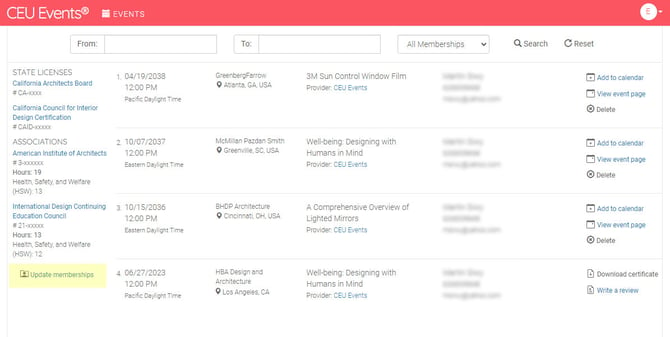
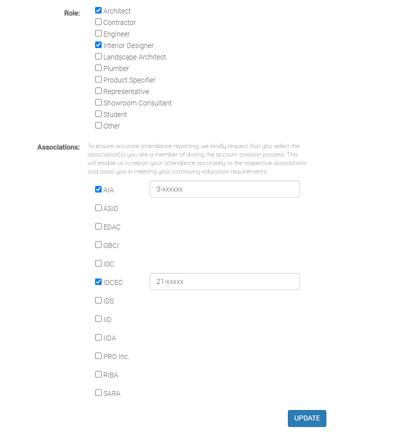
To update your memberships (associations)
- Select your Role from the drop-down. This determines which associations are relevant to your profession.
- The list of relevant associations populates based on your role.
- For each association that requires a membership number, enter your number in the field provided.
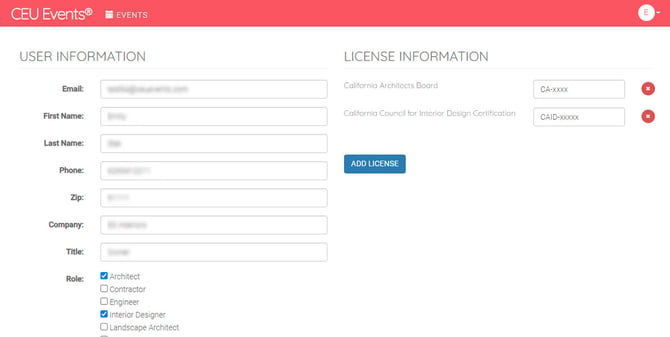
To add a state license
- Click Add License.
- Follow the prompts to enter the license type, state, and license number.
- Repeat for any additional licenses.
Save your changes
Once you've added or updated your memberships and licenses, click Update to save.
What happens after you update
- Your credentials are immediately applied to all new future events you attend.
- Click any organization name to find qualifying events. Each organization in your updated profile becomes a clickable link — clicking it takes you to a list of courses and events that meet the requirements to qualify for credit with that organization.
- For organizations that accept automatic reporting, CEU Events submits your applicable credits on your behalf — typically by the end of the next business day after you were marked 'Attended'.
- For credits from events you've already attended before adding new credentials, contact CEU Events support — they can let you know what's possible.
📝 Note: To see the full list of organizations CEU Events supports, visit the state licensing boards and associations page.
Best practices
- Update your credentials when they change. When you renew a license or join a new association, update your CEU Events account so future credits report correctly.
- Use the same name format across all your credentials. Many organizations match by name and number — using consistent formatting (e.g., "First Middle Last" everywhere) reduces matching errors.
- Add credentials before attending events. Setting them up before your next event ensures credits are reported correctly from the start.
- Review your credentials annually. Sign in and review your memberships and licenses once a year to make sure everything is current.
Troubleshooting
- You don't see your association in the list. Confirm you've selected the right Role — different roles surface different associations. If your association still doesn't appear, check the state licensing boards and associations page to see if CEU Events recognizes it. If not, contact CEU Events support — they can let you know if it's planned for support.
- Your credit reporting isn't going through. Confirm your membership or license number is entered correctly. Even small typos can cause matching failures with the reporting organization. If your number looks correct, contact CEU Events support.
- You attended an event before adding your credentials. Updating now affects future credits. For credits from previously attended events, contact CEU Events support — they can let you know what's possible.
- You're not sure whether a particular association requires a membership number. Try selecting it — if a number is required, the field will appear. If you don't have one, you can sometimes still register the affiliation; check directly with the association for their specific requirements.
- Still having trouble? Contact CEU Events support and we'll help.