🧑🎓 This article is for attendees.
After you attend a CEU event, you can download your Certificate of Completion directly from your CEU Events account — usually available before the end of the presentation. This article walks you through how to retrieve it on the web or via the mobile app, and what to do if your certificate isn't available yet.
📝 Note: Only the instructor of an event can mark attendees as Attended. This ensures the accuracy and integrity of attendance records. Your certificate becomes available once the instructor has marked you as Attended.
📝 Note: If you attended an event but never created a CEU Events account, you'll need to register first. Ask your instructor for the Event Code for the event you attended, then see Record Your Attendance with the Event Code.
📝 Note: For on-demand courses specifically, your certificate becomes available 2 hours after you complete the quiz.
What do you need before retrieving your certificate?
You'll need a CEU Events attendee account to retrieve your certificate. If you don't have one yet, you can create one in seconds during the sign-in workflow below.
How do you retrieve your certificate in a web browser?
- Sign in to www.ceuevents.com with your attendee account.
- If you don't have an account, click Create an account, complete the form, and click Continue.
- Locate the event from your list of attended events.
- Click the Download certificate button next to the event.
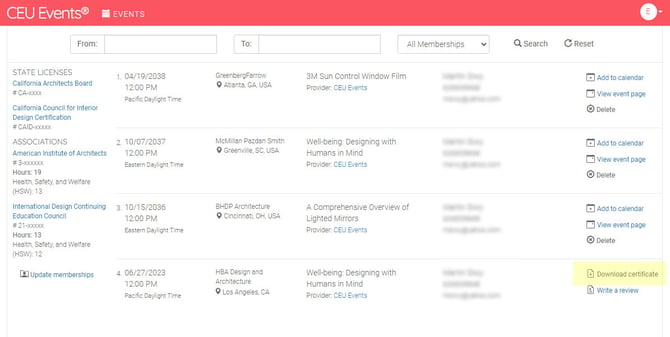
Your Certificate of Completion downloads as a PDF.
📝 Note: Certificates of completion are multi-page documents. The first page is the certificate itself, and subsequent pages contain important information about the approvals and recognitions associated with the course you attended. Keep all pages together when submitting to any board or association.
💡 Tip: CEU Events provides a convenient tool to help you filter your earned certificates by date range and membership or license — useful when you need to submit certificates for membership or license renewal.
How do you retrieve your certificate on the mobile app?
You can also retrieve your certificate using the CEU Events Mobile App. Download it at www.ceuevents.com/app and sign in with your attendee account.
- Sign in to the CEU Events Mobile App with your attendee account.
- Tap the event from your list of attended events.
- Tap the Download certificate button next to the event.
Your Certificate of Completion downloads as a PDF to your device.
What are the best practices for managing your certificates?
- Keep all pages together. Since certificates are multi-page documents, make sure all the recognition information stays attached when submitting.
- Make sure your membership and license info is on file. For accurate credit reporting, your CEU Events account needs your current membership and license numbers. Update them as they change.
- Be patient if the certificate isn't immediately available. The instructor needs to mark you as Attended before your certificate becomes available. Give them a chance to complete attendance — especially for larger events.
Troubleshooting: What should you do if your certificate is not available?
- You attended an event but you don't have a CEU Events account yet. You'll need to register before a certificate can be issued. Reach out to your instructor and ask for the Event Code for the event you attended — or an Attendance Reporting Guide. Once you have either, follow Record Your Attendance with the Event Code to create your account and register. Your certificate will be available here once you've recorded your attendance.
- You don't see the event in your account. This usually means one of two things: (1) you weren't marked as Attended yet — give the instructor time to update attendance, or (2) the event isn't linked to your account because you didn't record your attendance during the event. If the latter, reach out to the instructor and ask them to send the Attendance Recording Guide for that event so you can self-record.
- You see the event but no Download certificate button. The instructor hasn't marked you as Attended yet. Once they do, the button appears.
- Your credit hasn't been reported to your association yet. All applicable credits are reported by the end of the next business day after the event. If more time has passed and credits still aren't reflected, contact CEU Events support.
- You completed an on-demand course but don't see your certificate yet. For on-demand courses, certificates become available 2 hours after you complete the quiz. If 2 hours have passed and the certificate still isn't there, contact CEU Events support.